Webmaster level: Intermediate
As more and more users worldwide with mobile devices access the Internet, it’s fantastic to see so many websites making their content accessible and useful for those devices. To help webmasters optimize their sites we launched our recommendations for smartphones, feature-phones, tablets, and Googlebot-friendly sites in June 2012.
We’re happy to announce that those recommendations are now also available in Arabic, Brazilian Portuguese, Dutch, French, German, Italian, Japanese, Polish, Russian, Simplified Chinese, and Spanish. US-based webmasters are welcome to read the UK-English version.
We welcome you to go through our recommendations, pick the configuration that you feel will work best with your website, and get ready to jump on the mobile bandwagon!
Thanks to the fantastic webmaster-outreach team in Dublin, Tokyo and Beijing for making this possible!
Tampilkan postingan dengan label mobile. Tampilkan semua postingan
Tampilkan postingan dengan label mobile. Tampilkan semua postingan
Rabu, 20 Maret 2013

Senin, 12 November 2012
Giving Tablet Users the Full-Sized Web
Webmaster level: All
Since we announced Google’s recommendations for building smartphone-optimized websites, a common question we’ve heard from webmasters is how to best treat tablet devices. This is a similar question Android app developers face, and for that the Building Quality Tablet Apps guide is a great starting point.
Although we do not have specific recommendations for building search engine friendly tablet-optimized websites, there are some tips for building websites that serve smartphone and tablet users well.
When considering your site’s visitors using tablets, it’s important to think about both the devices and what users expect. Compared to smartphones, tablets have larger touch screens and are typically used on Wi-Fi connections. Tablets offer a browsing experience that can be as rich as any desktop or laptop machine, in a more mobile, lightweight, and generally more convenient package. This means that, unless you offer tablet-optimized content, users expect to see your desktop site rather than your site’s smartphone site.

Our recommendation for smartphone-optimized sites is to use responsive web design, which means you have one site to serve all devices. If your website uses responsive web design as recommended, be sure to test your website on a variety of tablets to make sure it serves them well too. Remember, just like for smartphones, there are a variety of device sizes and screen resolutions to test.
Another common configuration is to have separate sites for desktops and smartphones, and to redirect users to the relevant version. If you use this configuration, be careful not to inadvertently redirect tablet users to the smartphone-optimized site too.
In summary, any Android device that does not have the word “Mobile” in the user-agent is a tablet (or other large screen) device that is best served the desktop site.
For example, here’s the user-agent from Chrome on a Galaxy Nexus smartphone:
Or from Firefox on the Galaxy Nexus:
Compare those to the user-agent from Chrome on Nexus 7:
Or from Firefox on Nexus 7:
Because the Galaxy Nexus’s user agent includes “Mobile” it should be served your smartphone-optimized website, while the Nexus 7 should receive the full site.
We hope this helps you build better tablet-optimized websites. As always, please ask on our Webmaster Help forums if you have more questions.
Since we announced Google’s recommendations for building smartphone-optimized websites, a common question we’ve heard from webmasters is how to best treat tablet devices. This is a similar question Android app developers face, and for that the Building Quality Tablet Apps guide is a great starting point.
Although we do not have specific recommendations for building search engine friendly tablet-optimized websites, there are some tips for building websites that serve smartphone and tablet users well.
When considering your site’s visitors using tablets, it’s important to think about both the devices and what users expect. Compared to smartphones, tablets have larger touch screens and are typically used on Wi-Fi connections. Tablets offer a browsing experience that can be as rich as any desktop or laptop machine, in a more mobile, lightweight, and generally more convenient package. This means that, unless you offer tablet-optimized content, users expect to see your desktop site rather than your site’s smartphone site.

Our recommendation for smartphone-optimized sites is to use responsive web design, which means you have one site to serve all devices. If your website uses responsive web design as recommended, be sure to test your website on a variety of tablets to make sure it serves them well too. Remember, just like for smartphones, there are a variety of device sizes and screen resolutions to test.
Another common configuration is to have separate sites for desktops and smartphones, and to redirect users to the relevant version. If you use this configuration, be careful not to inadvertently redirect tablet users to the smartphone-optimized site too.
Telling Android smartphones and tablets apart
For Android-based devices, it’s easy to distinguish between smartphones and tablets using the user-agent string supplied by browsers: Although both Android smartphones and tablets will include the word “Android” in the user-agent string, only the user-agent of smartphones will include the word “Mobile”.In summary, any Android device that does not have the word “Mobile” in the user-agent is a tablet (or other large screen) device that is best served the desktop site.
For example, here’s the user-agent from Chrome on a Galaxy Nexus smartphone:
Mozilla/5.0 (Linux; Android 4.1.1; Galaxy Nexus Build/JRO03O) AppleWebKit/535.19 (KHTML, like Gecko) Chrome/18.0.1025.166 Mobile Safari/535.19Or from Firefox on the Galaxy Nexus:
Mozilla/5.0 (Android; Mobile; rv:16.0) Gecko/16.0 Firefox/16.0Compare those to the user-agent from Chrome on Nexus 7:
Mozilla/5.0 (Linux; Android 4.1.1; Nexus 7 Build/JRO03S) AppleWebKit/535.19 (KHTML, like Gecko) Chrome/18.0.1025.166 Safari/535.19Or from Firefox on Nexus 7:
Mozilla/5.0 (Android; Tablet; rv:16.0) Gecko/16.0 Firefox/16.0Because the Galaxy Nexus’s user agent includes “Mobile” it should be served your smartphone-optimized website, while the Nexus 7 should receive the full site.
We hope this helps you build better tablet-optimized websites. As always, please ask on our Webmaster Help forums if you have more questions.
Selasa, 11 September 2012
Introducing a new YouTube app for your iPhone and iPod touch
For all you diehard YouTube fans out there who can’t get enough YouTube on your mobile, we’ve got some great news: starting today, you can download the official YouTube app for iPhone and iPod touch from the App Store, bringing you more of the videos you love and more ways to share them with the people you care about.
The new app is built by YouTube engineers, to give our iPhone and iPod touch users the best mobile experience. Here’s what you’ll find:
Tens of thousands more videos: Watch official music videos like Taylor’s latest hit.
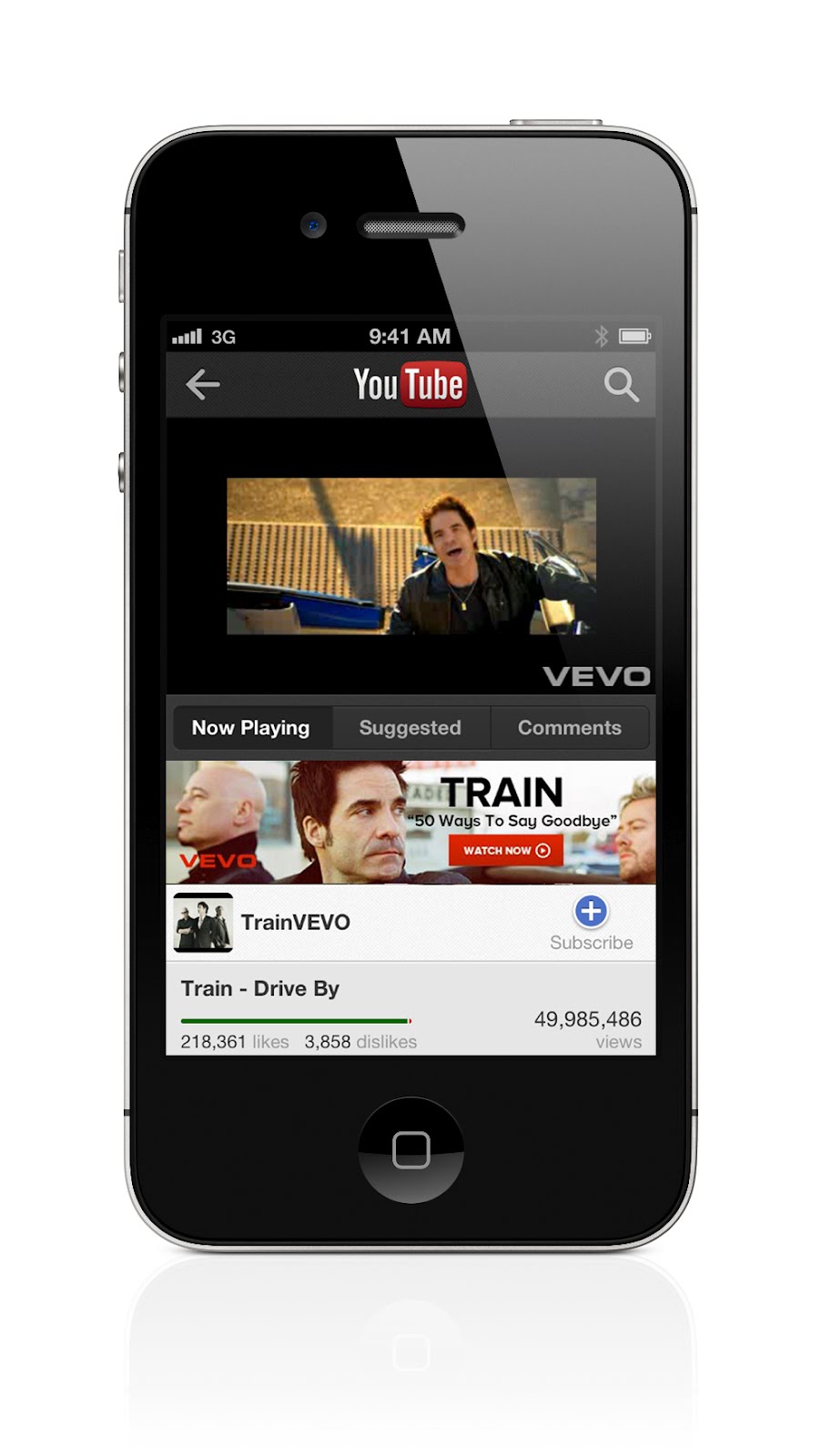
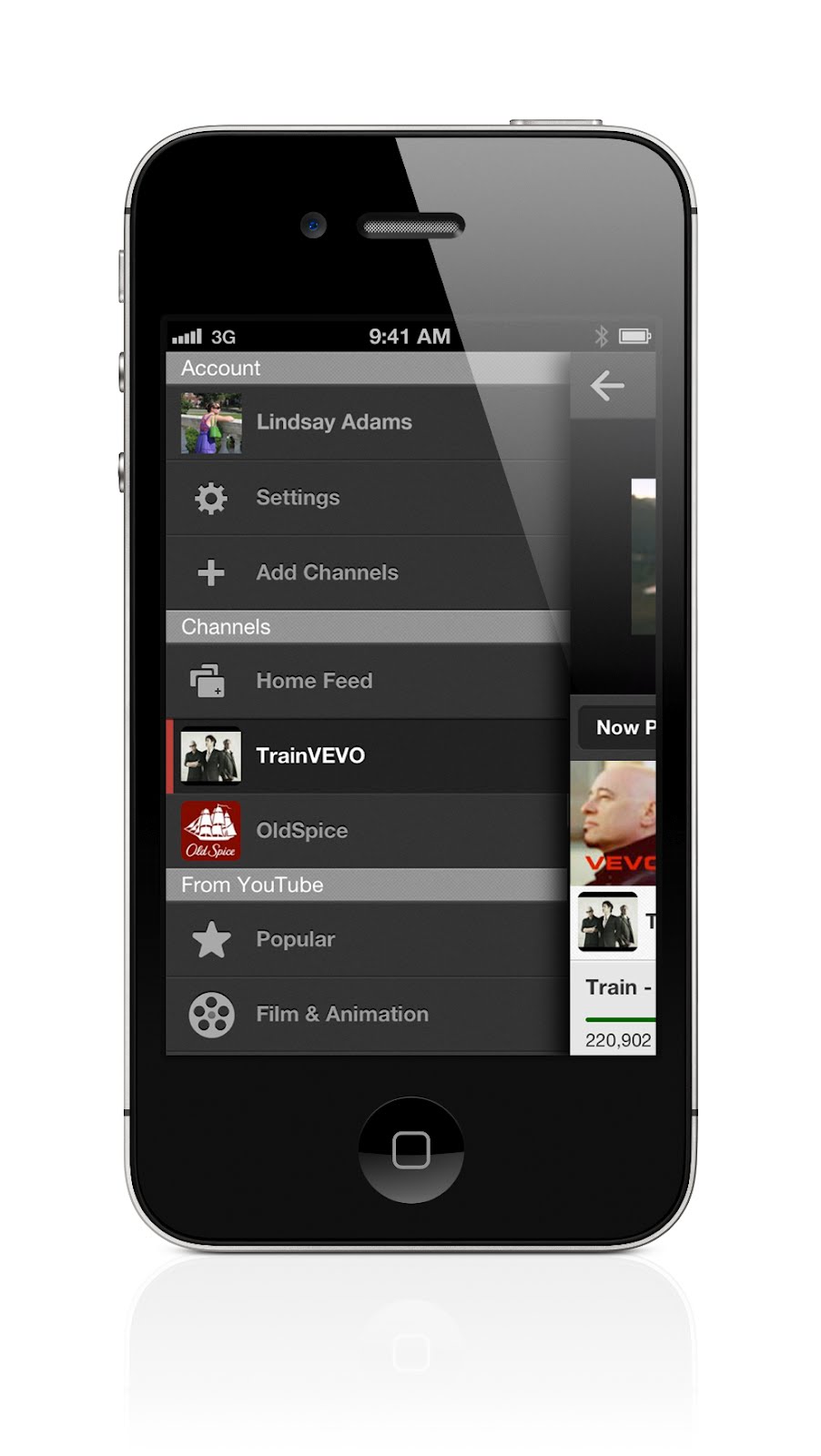
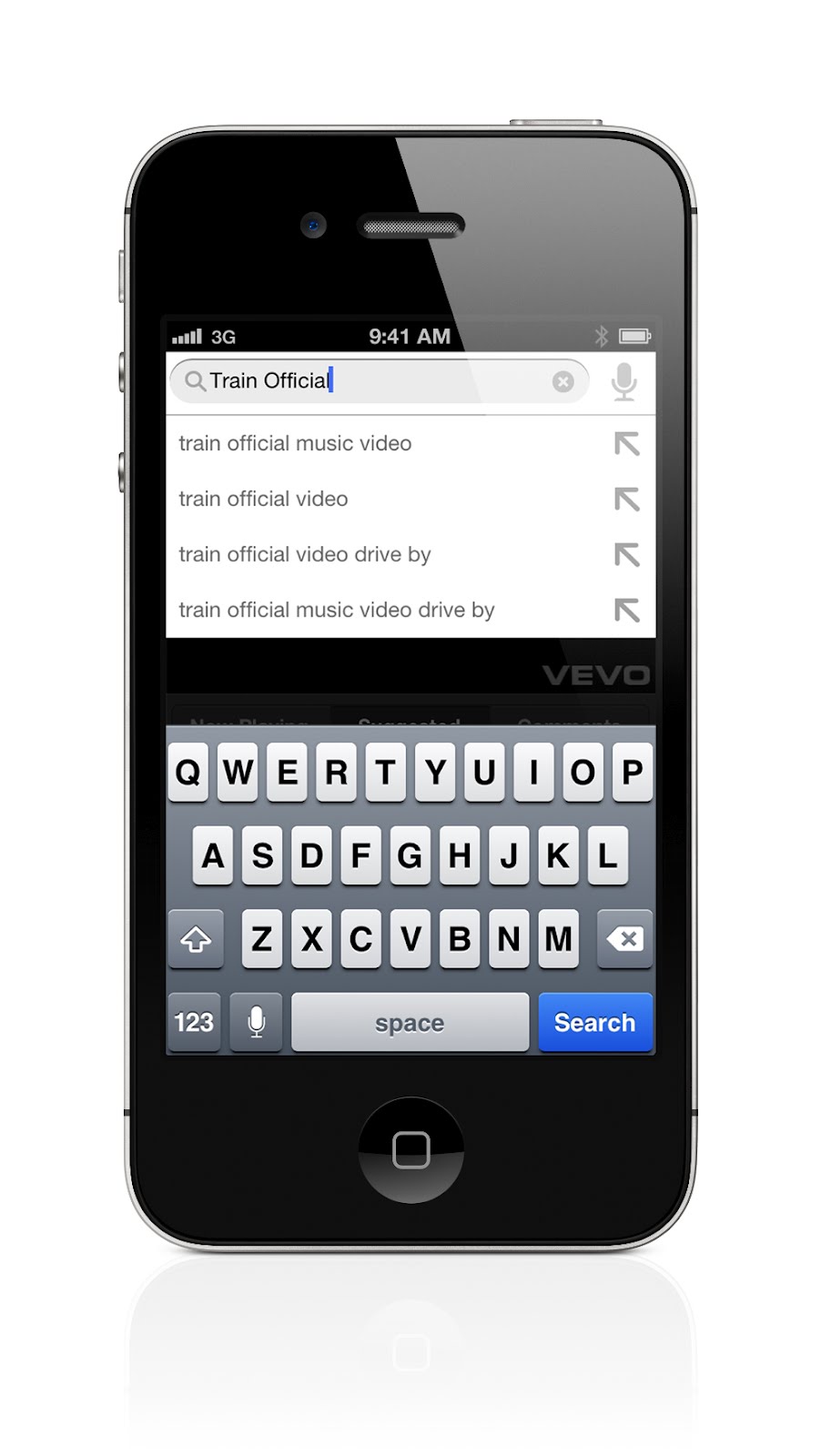
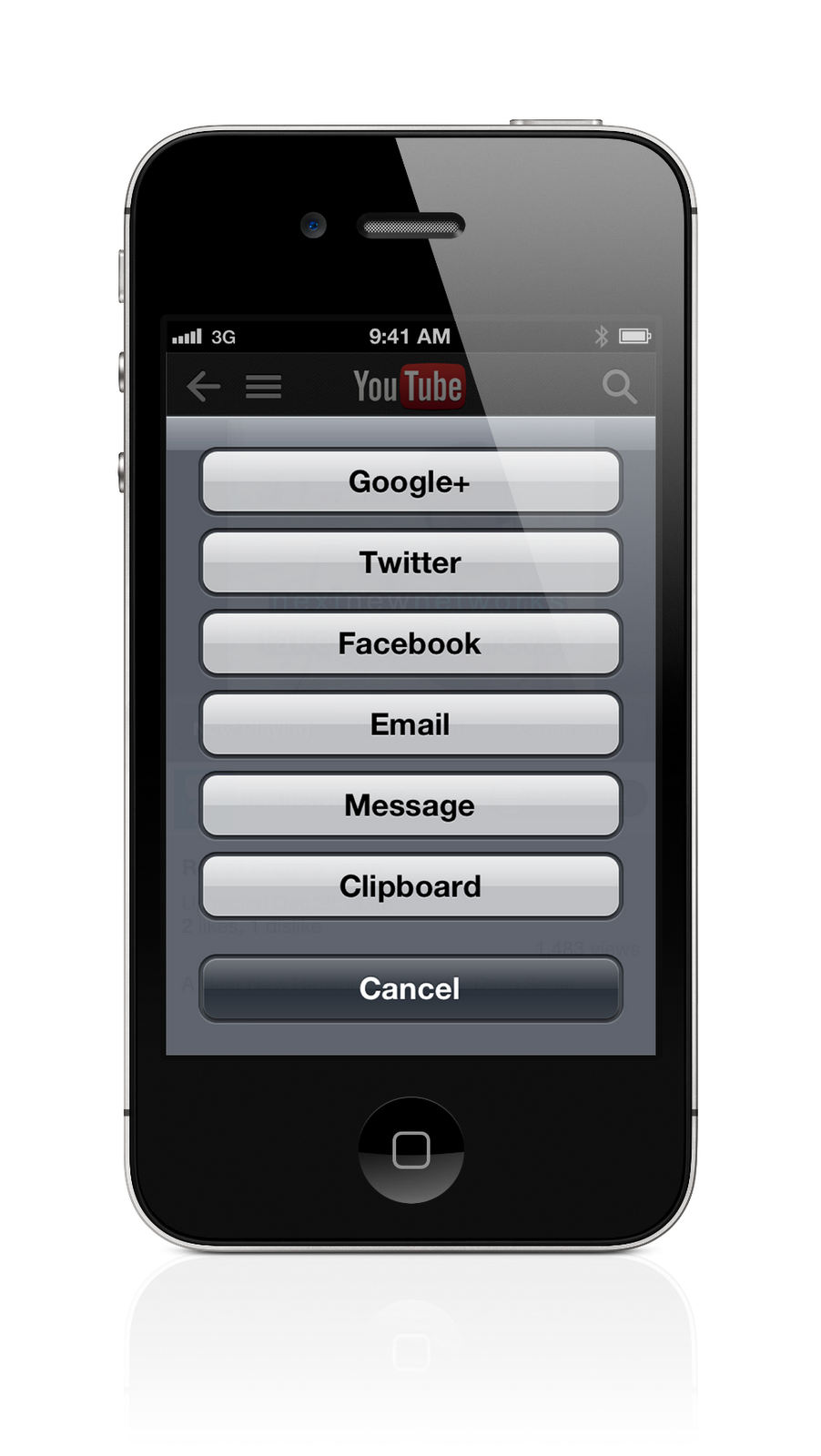
The new app is built by YouTube engineers, to give our iPhone and iPod touch users the best mobile experience. Here’s what you’ll find:
Tens of thousands more videos: Watch official music videos like Taylor’s latest hit.
New YouTube channel guide: Swipe your finger from the left edge of the screen to reveal a guide with your subscribed channels on YouTube, giving you instant access to everything from Alli Sports to YOMYOMF.
Find awesome videos faster: Get to videos like “Gangnam Style” faster with new search tools that give suggestions while you type, and let you sort through videos or channels. Flip through related videos, comments and more info, all while watching a video.
More ways to share with the people you love: Share that incredible video you found on YouTube on Google+, Facebook or text message in the app, as well as from Twitter and email.
There’s even more to explore with the new YouTube app for iPhone and iPod touch, available for download from the App Store today. We’re working on an optimized version of the YouTube app for iPad in the coming months, and stay tuned for more details.
You’ve already shown us you love YouTube on mobile—to the tune of 1 billion mobile views a day—so we can’t wait to see what you think about this new experience.
(Cross-posted on the YouTube blog)
Rabu, 29 Agustus 2012
Half a gigameter of biking navigation in 12 countries in Google Maps for Android
Whether you’re a seasoned century rider or a casual beach cruiser, finding the best biking routes can be a challenge. That’s why today we’re bringing mobile biking directions and navigation to the 10 countries where we launched desktop biking directions last month (Australia, Austria, Belgium, Denmark, Finland, the Netherlands, Norway, Sweden, Switzerland and the UK). Plus, we’re adding turn-by-turn, voice-guided biking navigation to Google Maps Navigation (beta) in every country with biking directions. Mount your device on your handlebars to see the turn-by-turn directions and navigation, or use speaker-mode to hear voice-guided directions.

We know there are lots of ways to get from here to there, which is why in 2010, we added biking directions to Google Maps in the U.S. and Canada, and continue to work to bring more biking features to more places. Today, there are more than 330,000 miles (equal to more than 530,000 kilometers, or half a gigameter) of green biking lines in Google Maps. Dark green lines on the map show dedicated bike trails and paths with no motor vehicles, light green lines show streets with bike lanes and dashed green lines show other streets recommended for cycling. Biking navigation even helps you avoid steep hills.

Where Map Maker and biking directions are both available, riders can add bike trails, lanes and suggested routes to Google Maps, helping to create a more comprehensive map for everyone living in or visiting their community. Thanks to the contributions of members of the biking community like Todd Scott and our partnership with nonprofits like Rails-to-Trails Conservancy, we’ve added bike data for hundreds of cities and trails to Google Maps in the past two-and-a-half years.
When you’re pedaling from Point A to Point B, we hope biking navigation will make Google Maps for Android more useful to you.
(Cross-posted on the Lat Long blog)

Turn-by-turn biking navigation in Copenhagen
We know there are lots of ways to get from here to there, which is why in 2010, we added biking directions to Google Maps in the U.S. and Canada, and continue to work to bring more biking features to more places. Today, there are more than 330,000 miles (equal to more than 530,000 kilometers, or half a gigameter) of green biking lines in Google Maps. Dark green lines on the map show dedicated bike trails and paths with no motor vehicles, light green lines show streets with bike lanes and dashed green lines show other streets recommended for cycling. Biking navigation even helps you avoid steep hills.

Bike layer showing recommended streets for cycling in Stockholm
Where Map Maker and biking directions are both available, riders can add bike trails, lanes and suggested routes to Google Maps, helping to create a more comprehensive map for everyone living in or visiting their community. Thanks to the contributions of members of the biking community like Todd Scott and our partnership with nonprofits like Rails-to-Trails Conservancy, we’ve added bike data for hundreds of cities and trails to Google Maps in the past two-and-a-half years.
When you’re pedaling from Point A to Point B, we hope biking navigation will make Google Maps for Android more useful to you.
(Cross-posted on the Lat Long blog)
Kamis, 09 Agustus 2012
Conquer the back to school blues with Google tools
August is both an end to the lush freedom of summer and the beginning of another year of student life. As a rising senior at the University of Florida, this time is both exciting and anxiety-inducing. Even though I’m looking forward to many aspects of the school year, there are certain things about college—from book budgets to calculus study sessions—that can make it a headache.
But this fall, I feel more prepared to face the daily student grind. This summer, I had the chance to intern on the communications team at Google and got the inside track on some tools and tricks to make school a snap. For example, did you know there was an extension for Chrome that helps you stay focused on your work? Yup, didn’t think so! So I thought I’d share some of my new favorite tips—my “Survival Guide for Student Life”—to help make it easier for all students to get through the coming months.
Easy ways to coordinate your social and extracurricular life

But this fall, I feel more prepared to face the daily student grind. This summer, I had the chance to intern on the communications team at Google and got the inside track on some tools and tricks to make school a snap. For example, did you know there was an extension for Chrome that helps you stay focused on your work? Yup, didn’t think so! So I thought I’d share some of my new favorite tips—my “Survival Guide for Student Life”—to help make it easier for all students to get through the coming months.
Easy ways to coordinate your social and extracurricular life
- Google+ Hangouts enables you to video chat with up to nine friends from your desktop, mobile phone or tablet. A great feature for when your club needs to discuss some last minute changes for the upcoming meeting.
- Stay on task with Hangout Apps like Symphonical, which provides a digital wall of sticky notes for virtual brainstorm sessions.
- With Google+ Events, invite all your friends to your get-together and attach a personalized video greeting to the invitation. During the event, photos from the party can be uploaded to the event page in real-time using Party Mode. So if you have to miss a party due to a study session, you can avoid that pesky FOMO (Fear of Missing Out)!
- Let your friends know what you’re up to by sharing your Google Calendar with them. Or create a shared calendar just for your study group.
- Stop the email flood from the ridiculous number of email lists you signed up for using Gmail’s auto-unsubscribe feature.
- No more sore eyes from crowded inboxes—Gmail's default mode is Priority Inbox so it automatically sorts your important messages for you.
- Cite your sources! Use Google Docs’ research tool to investigate highlighted portions of your essay and then generate a citation.
- Group projects call for collaboration. With Google Drive, you can use shared folders so everyone can access materials without having to email updates to each other.
- Using your laptop or phone, you can send any documents or presentations saved on your Google Drive to Fedex to be printed, thanks to Google Cloud Print.
- For those of you starting at university this year, Google Maps has 360-degree panoramic Street View imagery for many campuses around the world to give you a preview of your new stomping grounds.
- Back to school shopping is one of the most fun things about August. Find your way in and out of malls and department stores with indoor Google Maps on Android devices.
- We college students can’t go too long without homemade food. Search for your next flight home with Flight Search. (If flying makes you a bit queasy, track any care packages by typing the tracking code into the Google search bar.)
- Stay informed with Google Now. This feature, available on Android devices running Jelly Bean, can update you when the next bus is coming or provide the weather forecast for Saturday’s big game.
- Don’t break the bank on textbooks. Google Play has millions of FREE (emphasis is important) books readily available such as "Pride and Prejudice" and "Gulliver’s Travels."
- With the new Nexus 7 tablet, you can take your Google Play books, music, movies, TV shows, magazines and apps (like My Majors and doubleTwist Alarm Clock) with you, wherever you go.
- Locate hard-to-find books online or at a library near you with Book Search.
- Put Chrome to work with educational apps.
- Not a fan of traditional note taking? Chromebooks are a super fast and virus-proof laptop. It starts seconds after you boot it and will last through a whole day of classes.
- A fair portion of us students aren’t fans of mental math. Type any equation into the Google search box to get the answers you need. It can graph functions as well.
- We know we spend too much of our time watching funny videos on YouTube, but there are video channels that can actually help us learn more about a variety of subjects—from astrophysics to world history. Find more educational channels at YouTube EDU.

Kamis, 26 Juli 2012
Make your mark on Google with Handwrite for Mobile and Tablet Search
Unlike searching on a desktop or laptop computer, when you're searching on a touch-screen mobile device it’s often inconvenient to type. So we strive to give you a variety of ways to interact with Google, be it by speaking your queries, getting results before you finish typing, or searching by image. Now there’s a new way for you to interact with Google: Handwrite for web search on mobile phones and tablets.
Say you’re standing on a busy street corner, in a bumpy taxi ride, talking with a friend, or sitting on the couch with your tablet. Handwrite enables you to search by just writing letters with your finger most anywhere on your device’s screen—there’s no keyboard that covers half of the screen and no need for hunt-and-peck typing.
Getting started is easy: go to Google.com in your mobile browser, tap on “Settings” at the bottom of the screen and enable “Handwrite.” Note that after you've saved the setting, you may need to refresh the homepage to see the feature.

On tablets, the Search settings are available as an option behind the gear icon.

Once the feature is enabled, tap the Handwrite icon on the bottom right corner of your screen to activate the writing surface. Write a few letters and you’ll see autocomplete options appear below the search box. If one of the options is what you’re looking for, just tap it to search. For longer queries, you can continue writing and use the arrows next to the autocompletions to move the right one into the search box. Since you can write anywhere, you don’t have to look back and forth repeatedly from the keyboard to the search box.

For more tips and tricks on how to use Handwrite, see our Help Center article. To make accessing Google.com faster, be sure to bookmark it and add it to your home screen.
We designed Handwrite to complement rather than replace typing: with the feature enabled, you can still use the keyboard at any time by tapping on the search box. Handwrite is experimental, and works better in some browsers than others—on Android devices, it works best in Chrome. For now, we’ve enabled Handwrite for iOS5+ devices, Android 2.3+ phones and Android 4.0+ tablets—in 27 languages.
Have fun with this new way of searching!
(Cross-posted on the Inside Search Blog)
Say you’re standing on a busy street corner, in a bumpy taxi ride, talking with a friend, or sitting on the couch with your tablet. Handwrite enables you to search by just writing letters with your finger most anywhere on your device’s screen—there’s no keyboard that covers half of the screen and no need for hunt-and-peck typing.
Getting started is easy: go to Google.com in your mobile browser, tap on “Settings” at the bottom of the screen and enable “Handwrite.” Note that after you've saved the setting, you may need to refresh the homepage to see the feature.

On tablets, the Search settings are available as an option behind the gear icon.

Once the feature is enabled, tap the Handwrite icon on the bottom right corner of your screen to activate the writing surface. Write a few letters and you’ll see autocomplete options appear below the search box. If one of the options is what you’re looking for, just tap it to search. For longer queries, you can continue writing and use the arrows next to the autocompletions to move the right one into the search box. Since you can write anywhere, you don’t have to look back and forth repeatedly from the keyboard to the search box.

For more tips and tricks on how to use Handwrite, see our Help Center article. To make accessing Google.com faster, be sure to bookmark it and add it to your home screen.
We designed Handwrite to complement rather than replace typing: with the feature enabled, you can still use the keyboard at any time by tapping on the search box. Handwrite is experimental, and works better in some browsers than others—on Android devices, it works best in Chrome. For now, we’ve enabled Handwrite for iOS5+ devices, Android 2.3+ phones and Android 4.0+ tablets—in 27 languages.
Have fun with this new way of searching!
(Cross-posted on the Inside Search Blog)
Rabu, 27 Juni 2012
Android @ I/O: the playground is open
(Cross-posted on the Official Android Blog)
Last year at Google I/O, we talked about momentum, mobile and more. This year, we’re picking up right where we left off. More than 400 million Android devices have now been activated—up from 100 million last June. And twelve new Android devices are activated every every second—that’s more than 1 million a day. Today, we’re rolling out a new version of Android called Jelly Bean, adding more entertainment to Google Play, and introducing two powerful—yet distinctly different Nexus devices to bring you the best of Google.
Jelly Bean: simple, beautiful and beyond smart
Jelly Bean builds on top of Ice Cream Sandwich. It makes everything smoother, faster and more fluid. For example, notifications are now more dynamic: if you’re late for a meeting or missed a call, you can email or call directly from notifications. The keyboard is smarter and more accurate, and can predict your next word. And voice typing is faster, working even when you don’t have a data connection.
We’ve redesigned search from the ground up in Jelly Bean, with a new user interface and faster, more natural Voice Search. You can type your query or simply ask Google a question. Google can speak back to you, delivering a precise answer, powered by the Knowledge Graph, if it knows one, in addition to a list of search results.
Today’s smart devices still rely on you to do pretty much everything—that is, until now. Google Now is a new feature that gets you just the right information at just the right time. It tells you today’s weather before you start your day, how much traffic to expect before you leave for work, or your favorite team's score as they’re playing. There’s no digging required: cards appear at the moment you need them most.
Starting in mid-July, we’ll start rolling out over-the-air updates to Galaxy Nexus, Motorola Xoom and Nexus S, and we’ll also release Jelly Bean to open source.
Google Play: more entertainment
Google Play is your digital entertainment destination, with more than 600,000 apps and games plus music, movies and books. It’s entirely cloud-based, which means all of your content is always available across all of your devices. Today our store is expanding to include magazines. We’ve been working with leading publishers Condé Nast, Hearst, Meredith and more to offer magazines like House Beautiful, Men’s Health, Shape and WIRED.
Now, you can also purchase movies in addition to renting them. And we’re adding television shows on Google Play—in fact, we’re adding thousands of episodes of broadcast and cable TV shows, like "Revenge," "Parks & Recreation" and "Breaking Bad," from some of the top studios, like ABC Studios, NBCUniversal and Sony Pictures. You can play back movies and TV shows on all your Android devices, through Google Play on the web, and on YouTube, and soon we’ll bring the experience to Google TV devices.
Movie purchases, TV shows and magazines are available today on play.google.com, and will roll out to Google Play on devices over the coming days.
Nexus 7: powerful, portable and designed for Google Play
All of this great Google Play content comes to life on Nexus 7, a powerful new tablet with a vibrant, 7” 1280x800 HD display. The Tegra-3 chipset, with a quad-core CPU and 12-core GPU, makes everything, including games, extremely fast. And best of all, it’s only 340 grams, lighter than most tablets out there. Nexus 7 was built to bring you the best of Google in the palm of your hand. Hang out with up to 10 friends on Google+ using the front-facing camera, browse the web blazingly fast with Chrome and, of course, crank through your emails with Gmail.
Nexus 7 comes preloaded with some great entertainment, including the movie "Transformers: Dark of the Moon," the book “The Bourne Dominion,” magazines like Condé Nast Traveler and Popular Science, and songs from bands like Coldplay and the Rolling Stones. We’ve also included a $25 credit to purchase your favorite movies, books and more from Google Play, for a limited time. Nexus 7 is available for preorder today from Google Play in the U.S., U.K., Canada and Australia, and starts at $199 in the U.S. It will start shipping mid-July.
Nexus Q: It’s a sphere!
It's great to be able to take your entertainment with you wherever you go, but sometimes you want to ditch the headphones and enjoy music with friends and family. So we’re introducing Nexus Q, which combines the power of Android and Google Play to easily stream music and video in your home—all controlled by an Android phone or tablet. Designed and engineered by Google, Nexus Q is a small sphere that plugs into the best speakers and TV in your house. It’s the first-ever social streaming device—like a cloud-connected jukebox where everyone brings their own music to the party. Available first in the U.S., you can preorder Nexus Q today from Google Play for $299, and it will ship mid-July.
If you own one of the 400 million Android devices out there, you already know that it’s much more than simply a phone or tablet. It’s your connection to the best of Google—all of your stuff and entertainment, everywhere you go. Now you have a new version of Android, more entertainment and a growing portfolio of Nexus devices to choose from—all available in Google Play. The playground is open.
Last year at Google I/O, we talked about momentum, mobile and more. This year, we’re picking up right where we left off. More than 400 million Android devices have now been activated—up from 100 million last June. And twelve new Android devices are activated every every second—that’s more than 1 million a day. Today, we’re rolling out a new version of Android called Jelly Bean, adding more entertainment to Google Play, and introducing two powerful—yet distinctly different Nexus devices to bring you the best of Google.
Jelly Bean: simple, beautiful and beyond smart
Jelly Bean builds on top of Ice Cream Sandwich. It makes everything smoother, faster and more fluid. For example, notifications are now more dynamic: if you’re late for a meeting or missed a call, you can email or call directly from notifications. The keyboard is smarter and more accurate, and can predict your next word. And voice typing is faster, working even when you don’t have a data connection.
We’ve redesigned search from the ground up in Jelly Bean, with a new user interface and faster, more natural Voice Search. You can type your query or simply ask Google a question. Google can speak back to you, delivering a precise answer, powered by the Knowledge Graph, if it knows one, in addition to a list of search results.
Today’s smart devices still rely on you to do pretty much everything—that is, until now. Google Now is a new feature that gets you just the right information at just the right time. It tells you today’s weather before you start your day, how much traffic to expect before you leave for work, or your favorite team's score as they’re playing. There’s no digging required: cards appear at the moment you need them most.
Starting in mid-July, we’ll start rolling out over-the-air updates to Galaxy Nexus, Motorola Xoom and Nexus S, and we’ll also release Jelly Bean to open source.
Google Play: more entertainment
Google Play is your digital entertainment destination, with more than 600,000 apps and games plus music, movies and books. It’s entirely cloud-based, which means all of your content is always available across all of your devices. Today our store is expanding to include magazines. We’ve been working with leading publishers Condé Nast, Hearst, Meredith and more to offer magazines like House Beautiful, Men’s Health, Shape and WIRED.
Now, you can also purchase movies in addition to renting them. And we’re adding television shows on Google Play—in fact, we’re adding thousands of episodes of broadcast and cable TV shows, like "Revenge," "Parks & Recreation" and "Breaking Bad," from some of the top studios, like ABC Studios, NBCUniversal and Sony Pictures. You can play back movies and TV shows on all your Android devices, through Google Play on the web, and on YouTube, and soon we’ll bring the experience to Google TV devices.
Movie purchases, TV shows and magazines are available today on play.google.com, and will roll out to Google Play on devices over the coming days.
Nexus 7: powerful, portable and designed for Google Play
All of this great Google Play content comes to life on Nexus 7, a powerful new tablet with a vibrant, 7” 1280x800 HD display. The Tegra-3 chipset, with a quad-core CPU and 12-core GPU, makes everything, including games, extremely fast. And best of all, it’s only 340 grams, lighter than most tablets out there. Nexus 7 was built to bring you the best of Google in the palm of your hand. Hang out with up to 10 friends on Google+ using the front-facing camera, browse the web blazingly fast with Chrome and, of course, crank through your emails with Gmail.
Nexus 7 comes preloaded with some great entertainment, including the movie "Transformers: Dark of the Moon," the book “The Bourne Dominion,” magazines like Condé Nast Traveler and Popular Science, and songs from bands like Coldplay and the Rolling Stones. We’ve also included a $25 credit to purchase your favorite movies, books and more from Google Play, for a limited time. Nexus 7 is available for preorder today from Google Play in the U.S., U.K., Canada and Australia, and starts at $199 in the U.S. It will start shipping mid-July.
Nexus Q: It’s a sphere!
It's great to be able to take your entertainment with you wherever you go, but sometimes you want to ditch the headphones and enjoy music with friends and family. So we’re introducing Nexus Q, which combines the power of Android and Google Play to easily stream music and video in your home—all controlled by an Android phone or tablet. Designed and engineered by Google, Nexus Q is a small sphere that plugs into the best speakers and TV in your house. It’s the first-ever social streaming device—like a cloud-connected jukebox where everyone brings their own music to the party. Available first in the U.S., you can preorder Nexus Q today from Google Play for $299, and it will ship mid-July.
If you own one of the 400 million Android devices out there, you already know that it’s much more than simply a phone or tablet. It’s your connection to the best of Google—all of your stuff and entertainment, everywhere you go. Now you have a new version of Android, more entertainment and a growing portfolio of Nexus devices to choose from—all available in Google Play. The playground is open.
Kamis, 07 Juni 2012
AdWords, meet AdMob
Mobile advertising has become a core part of marketers’ and publishers’ digital strategies, helping to fuel business growth and great content.
To make mobile ad buying seamless and accessible for more than a million AdWords advertisers, today we're integrating our AdMob technology directly into our AdWords system. This enables advertisers to run effective campaigns across the more than 300,000 mobile applications running ads by AdMob—all from within the AdWords interface. It also helps AdMob developers and publishers increase their revenue by giving them access to a large number of new advertisers. AdWords advertisers can now manage, measure and adjust search, display and video ads, reaching people on more than 2 million websites and hundreds of thousands of apps, across all screens.
Bringing together the best of AdWords with the best of AdMob is an important step in building integrated solutions that help all businesses get the most out of digital marketing. This complements DoubleClick Digital Marketing, our new unified ad platform for larger marketers and agencies who use DoubleClick’s ad technology, which we announced earlier this week.
As mobile usage continues to explode, businesses increasingly need to adapt their marketing strategies to mobile platforms and mobile-specific consumer trends. For more information about how AdWords is helping marketers “go mobile,” read our post on the Mobile Ads Blog.
To make mobile ad buying seamless and accessible for more than a million AdWords advertisers, today we're integrating our AdMob technology directly into our AdWords system. This enables advertisers to run effective campaigns across the more than 300,000 mobile applications running ads by AdMob—all from within the AdWords interface. It also helps AdMob developers and publishers increase their revenue by giving them access to a large number of new advertisers. AdWords advertisers can now manage, measure and adjust search, display and video ads, reaching people on more than 2 million websites and hundreds of thousands of apps, across all screens.
Bringing together the best of AdWords with the best of AdMob is an important step in building integrated solutions that help all businesses get the most out of digital marketing. This complements DoubleClick Digital Marketing, our new unified ad platform for larger marketers and agencies who use DoubleClick’s ad technology, which we announced earlier this week.
As mobile usage continues to explode, businesses increasingly need to adapt their marketing strategies to mobile platforms and mobile-specific consumer trends. For more information about how AdWords is helping marketers “go mobile,” read our post on the Mobile Ads Blog.
Rabu, 06 Juni 2012
Recommendations for building smartphone-optimized websites
Webmaster level: All
Every day more and more smartphones get activated and more websites are producing smartphone-optimized content. Since we last talked about how to build mobile-friendly websites, we’ve been working hard on improving Google’s support for smartphone-optimized content. As part of this effort, we launched Googlebot-Mobile for smartphones back in December 2011, which is specifically tasked with identifying such content.
Today we’d like to give you Google’s recommendations for building smartphone-optimized websites and explain how to do so in a way that gives both your desktop- and smartphone-optimized sites the best chance of performing well in Google’s search results.
Recommendations for smartphone-optimized sites
The full details of our recommendation can be found in our new help site, which we now summarize.
When building a website that targets smartphones, Google supports three different configurations:
Sites that use responsive web design, i.e. sites that serve all devices on the same set of URLs, with each URL serving the same HTML to all devices and using just CSS to change how the page is rendered on the device. This is Google’s recommended configuration.
Sites that dynamically serve all devices on the same set of URLs, but each URL serves different HTML (and CSS) depending on whether the user agent is a desktop or a mobile device.
Sites that have a separate mobile and desktop sites.
Responsive web design
Responsive web design is a technique to build web pages that alter how they look using CSS3 media queries. That is, there is one HTML code for the page regardless of the device accessing it, but its presentation changes using CSS media queries to specify which CSS rules apply for the browser displaying the page. You can learn more about responsive web design from this blog post by Google's webmasters and in our recommendations.
Using responsive web design has multiple advantages, including:
It keeps your desktop and mobile content on a single URL, which is easier for your users to interact with, share, and link to and for Google’s algorithms to assign the indexing properties to your content.
Google can discover your content more efficiently as we wouldn't need to crawl a page with the different Googlebot user agents to retrieve and index all the content.
Device-specific HTML
However, we appreciate that for many situations it may not be possible or appropriate to use responsive web design. That’s why we support having websites serve equivalent content using different, device-specific, HTML. The device-specific HTML can be served on the same URL (a configuration called dynamic serving) or different URLs (such as www.example.com and m.example.com).
If your website uses a dynamic serving configuration, we strongly recommend using the Vary HTTP header to communicate to caching servers and our algorithms that the content may change for different user agents requesting the page. We also use this as a crawling signal for Googlebot-Mobile. More details are here.
As for the separate mobile site configuration, since there are many ways to do this, our recommendation introduces annotations that communicate to our algorithms that your desktop and mobile pages are equivalent in purpose; that is, the new annotations describe the relationship between the desktop and mobile content as alternatives of each other and should be treated as a single entity with each alternative targeting a specific class of device.
These annotations will help us discover your smartphone-optimized content and help our algorithms understand the structure of your content, giving it the best chance of performing well in our search results.
Conclusion
This blog post is only a brief summary of our recommendation for building smartphone-optimized websites. Please read the full recommendation and see which supported implementation is most suitable for your site and users. And, as always, please ask on our Webmaster Help forums if you have more questions.
Kamis, 24 Mei 2012
Google+ for Android: polish and performance
We continue to work toward a simpler, more beautiful Google, and today we're accelerating these efforts with a new Google+ app for Android phones. The update includes lots of highly-requested features—like the ability to start a hangout on the go, and to edit posts inline—as well as a stream that celebrates the rich content shared across Google+. In all cases we're building for a mobile future, and we're excited about what's ahead.
Start a hangout from anywhere, and ring the folks that matter most
With Hangouts we want to help people connect face-to-face-to-face—at any time, from anywhere. Of course, there's really only one device that's always by your side—your phone—so we've invested in mobile hangouts since early on. Today we're adding another important feature to the mix: the ability to start a hangout directly from your mobile device.
To get started, tap “Hangout” in the (new) navigation ribbon, add some friends and tap “Start.” We'll ring their phones (if you want), and if someone misses the hangout, they can ring you back with a single tap.
Share your favorites, and feel awesome afterward
When you share with your circles, we owe you an experience that's both intimate and immersive. Your time and your relationships are precious, after all, so your posts should make you feel proud. Today's new Android app takes this to heart, with full-screen media in the stream, conversations that fade into view and instantly-touchable actions like +1.
Do more, in less time
We think you’ll find today’s app nicer to look at, but we’re also making it easier to use. Improvements include:
Start a hangout from anywhere, and ring the folks that matter most
With Hangouts we want to help people connect face-to-face-to-face—at any time, from anywhere. Of course, there's really only one device that's always by your side—your phone—so we've invested in mobile hangouts since early on. Today we're adding another important feature to the mix: the ability to start a hangout directly from your mobile device.
To get started, tap “Hangout” in the (new) navigation ribbon, add some friends and tap “Start.” We'll ring their phones (if you want), and if someone misses the hangout, they can ring you back with a single tap.
Share your favorites, and feel awesome afterward
When you share with your circles, we owe you an experience that's both intimate and immersive. Your time and your relationships are precious, after all, so your posts should make you feel proud. Today's new Android app takes this to heart, with full-screen media in the stream, conversations that fade into view and instantly-touchable actions like +1.
Do more, in less time
We think you’ll find today’s app nicer to look at, but we’re also making it easier to use. Improvements include:
- A navigation ribbon that slides in and out, providing quick access to just about everything
- The ability to download photos directly from Google+, and turn them into wallpaper
- The chance to edit posts inline, in case you make any mistakes while on the go
Selected screenshots from today’s new Android app
Rabu, 23 Mei 2012
A faster, simpler Google Search app for iPhone
Starting today, when you use the Google Search app on your iPhone, you’ll see a completely redesigned interface that gives you faster results, beautiful full-screen image search, and a simple way to access all your Google apps in one place.

Get results, fast
When you’re on the go, you usually want to get things done quickly. Autocompletion of search suggestions is significantly faster in this latest version of the app, bringing you search predictions instantly with each letter you type. You’ll also notice that results load faster, and checking out webpages is easy with the slide-in panel. Quickly swipe back and forth between webpages and your search results, and swap between search modes like Images and Places with a swipeable menu. Finding text within a webpage is a snap as well; just try tapping the magnifying glass on the bottom menu option on any page.
Beautiful Image Search
Searching for images will never again be a chore. Tap the images button at the bottom of the search results page, and watch high-resolution images load into a beautiful grid. Browse the images by scrolling down the full-screen grid, or tap on a single image to get details about it and then quickly swipe from image to image. You can also tap and hold an image to save it to your camera roll to use as your wallpaper or share with a friend.


Simple access
We’ve put all of your favorite Google services in one place for easy access. You can choose to browse Google web apps, or see just the apps that you have on your phone. Sign in once, and you’ll never need to sign in again to check a quick email, view your next calendar appointment or see what’s hot on Google+.

Download the Google Search app now for a fast, beautiful, simple search experience on your iPhone.

Search by voice, by typing, or with your camera
Get results, fast
When you’re on the go, you usually want to get things done quickly. Autocompletion of search suggestions is significantly faster in this latest version of the app, bringing you search predictions instantly with each letter you type. You’ll also notice that results load faster, and checking out webpages is easy with the slide-in panel. Quickly swipe back and forth between webpages and your search results, and swap between search modes like Images and Places with a swipeable menu. Finding text within a webpage is a snap as well; just try tapping the magnifying glass on the bottom menu option on any page.
 |  |
Easily switch between search modes using the swipeable menu at the bottom | Swipe the slide-in panel to instantly return to your search results |
Beautiful Image Search
Searching for images will never again be a chore. Tap the images button at the bottom of the search results page, and watch high-resolution images load into a beautiful grid. Browse the images by scrolling down the full-screen grid, or tap on a single image to get details about it and then quickly swipe from image to image. You can also tap and hold an image to save it to your camera roll to use as your wallpaper or share with a friend.

Full-screen image results take advantage of every inch of the screen

Swipe or tap on the edges to move between images
Sutro Tower image by Marc Liyanage
Simple access
We’ve put all of your favorite Google services in one place for easy access. You can choose to browse Google web apps, or see just the apps that you have on your phone. Sign in once, and you’ll never need to sign in again to check a quick email, view your next calendar appointment or see what’s hot on Google+.

All your Google mobile apps in one place
Download the Google Search app now for a fast, beautiful, simple search experience on your iPhone.
Selasa, 22 Mei 2012
We’ve acquired Motorola Mobility
The phones in our pockets have become supercomputers that are changing the way we live. It’s now possible to do things we used to think were magic, or only possible on Star Trek—like get directions right from where we are standing; watch a video on YouTube; or take a picture and share the moment instantly with friends.
It’s why I’m excited to announce today that our Motorola Mobility deal has closed. Motorola is a great American tech company that has driven the mobile revolution, with a track record of over 80 years of innovation, including the creation of the first cell phone. We all remember Motorola’s StarTAC, which at the time seemed tiny and showed the real potential of these devices. And as a company who made a big, early bet on Android, Motorola has become an incredibly valuable partner to Google.
Sanjay Jha, who was responsible for building the company and placing that big bet on Android, has stepped down as CEO. I would like to thank him for his efforts and am tremendously pleased that he will be working to ensure a smooth transition as long-time Googler Dennis Woodside takes over as CEO of Motorola Mobility.
I’ve known Dennis for nearly a decade, and he’s been phenomenal at building teams and delivering on some of Google’s biggest bets. One of his first jobs at Google was to put on his backpack and build our businesses across the Middle East, Africa, Eastern Europe and Russia. More recently he helped increase our revenue in the U.S. from $10.8 billion to $17.5 billion in under three years as President of the Americas region. Dennis has always been a committed partner to our customers and I know he will be an outstanding leader of Motorola. As an Ironman triathlete, he’s got plenty of energy for the journey ahead—and he’s already off to great start with some very strong new hires for the Motorola team.
It’s a well known fact that people tend to overestimate the impact technology will have in the short term, but underestimate its significance in the longer term. Many users coming online today may never use a desktop machine, and the impact of that transition will be profound—as will the ability to just tap and pay with your phone. That’s why it’s a great time to be in the mobile business, and why I’m confident Dennis and the team at Motorola will be creating the next generation of mobile devices that will improve lives for years to come.
It’s why I’m excited to announce today that our Motorola Mobility deal has closed. Motorola is a great American tech company that has driven the mobile revolution, with a track record of over 80 years of innovation, including the creation of the first cell phone. We all remember Motorola’s StarTAC, which at the time seemed tiny and showed the real potential of these devices. And as a company who made a big, early bet on Android, Motorola has become an incredibly valuable partner to Google.
Sanjay Jha, who was responsible for building the company and placing that big bet on Android, has stepped down as CEO. I would like to thank him for his efforts and am tremendously pleased that he will be working to ensure a smooth transition as long-time Googler Dennis Woodside takes over as CEO of Motorola Mobility.
I’ve known Dennis for nearly a decade, and he’s been phenomenal at building teams and delivering on some of Google’s biggest bets. One of his first jobs at Google was to put on his backpack and build our businesses across the Middle East, Africa, Eastern Europe and Russia. More recently he helped increase our revenue in the U.S. from $10.8 billion to $17.5 billion in under three years as President of the Americas region. Dennis has always been a committed partner to our customers and I know he will be an outstanding leader of Motorola. As an Ironman triathlete, he’s got plenty of energy for the journey ahead—and he’s already off to great start with some very strong new hires for the Motorola team.
It’s a well known fact that people tend to overestimate the impact technology will have in the short term, but underestimate its significance in the longer term. Many users coming online today may never use a desktop machine, and the impact of that transition will be profound—as will the ability to just tap and pay with your phone. That’s why it’s a great time to be in the mobile business, and why I’m confident Dennis and the team at Motorola will be creating the next generation of mobile devices that will improve lives for years to come.
Selasa, 15 Mei 2012
New research shows smartphone growth is global
Last October, we launched Our Mobile Planet, a resource enabling anyone to visualize the ways smartphones are transforming how people connect with information, each other and the places around them.
Today, we're releasing new 2012 research data, and the findings are clear—smartphone adoption has gone global. Today, Australia, U.K., Sweden, Norway, Saudi Arabia and UAE each have more than 50 percent of their population on smartphones. An additional seven countries—U.S., New Zealand, Denmark, Ireland, Netherlands, Spain and Switzerland—now have greater than 40 percent smartphone penetration. In the U.S., 80 percent of smartphone owners say they don’t leave home without their device—and one in three would even give up their TV before their mobile devices!

We conducted this research to help people to better understand how mobile is changing our world. You can learn about mobile-specific usage trends, use this tool to create custom visualizations of data and more. There's plenty to discover in the latest research—to dig into new survey data about smartphone consumers in 26 countries from around the world, read our post on the Google Mobile Ads blog or visit http://thinkwithgoogle.com/mobileplanet.
Today, we're releasing new 2012 research data, and the findings are clear—smartphone adoption has gone global. Today, Australia, U.K., Sweden, Norway, Saudi Arabia and UAE each have more than 50 percent of their population on smartphones. An additional seven countries—U.S., New Zealand, Denmark, Ireland, Netherlands, Spain and Switzerland—now have greater than 40 percent smartphone penetration. In the U.S., 80 percent of smartphone owners say they don’t leave home without their device—and one in three would even give up their TV before their mobile devices!
We conducted this research to help people to better understand how mobile is changing our world. You can learn about mobile-specific usage trends, use this tool to create custom visualizations of data and more. There's plenty to discover in the latest research—to dig into new survey data about smartphone consumers in 26 countries from around the world, read our post on the Google Mobile Ads blog or visit http://thinkwithgoogle.com/mobileplanet.
Rabu, 09 Mei 2012
Google+: a mobile app with sense and soul
Sharing is deeply sensory. From cooking a favorite meal to getting together with friends, it's the smells and the stories and the smiles that make human connections so essential. With Google+ we want to extend these moments online, so it’s only right to focus on the most personal of personal computers: your mobile phone.
To be clear, we’re not interested in a mobile or social experience that’s just smaller. We’re embracing the sensor-rich smartphone (with its touchable screen and high-density display), and transforming Google+ into something more intimate, and more expressive. Today’s new iPhone app is an important step in this direction—toward a simpler, more beautiful Google.
A feast for the eyes
Full-bleed photos and videos are cool. But you know what’s really cool? Content so immersive it remakes your mobile device into a rich carousel of beloved memories and breaking news. That’s the Google+ experience we aspire to, and today’s release helps us get closer:
Looks alone aren't enough—you also need an app that's fast and fluid. Even a simple swipe gesture can inspire the same “wheeee!” as the bubble wands and ball pits we enjoy(ed) as kids. So today’s update pays special attention to fun and performance:
To be clear, we’re not interested in a mobile or social experience that’s just smaller. We’re embracing the sensor-rich smartphone (with its touchable screen and high-density display), and transforming Google+ into something more intimate, and more expressive. Today’s new iPhone app is an important step in this direction—toward a simpler, more beautiful Google.
A feast for the eyes
Full-bleed photos and videos are cool. But you know what’s really cool? Content so immersive it remakes your mobile device into a rich carousel of beloved memories and breaking news. That’s the Google+ experience we aspire to, and today’s release helps us get closer:
- Whether you post photos or articles or text, we’re making ‘em look gooood
- We’re adding crisper fonts, larger profile pics and a friendlier homescreen
- We’re making the stream easier to scan, and easier on the eyes with overlays, gradients and other visual elements
Looks alone aren't enough—you also need an app that's fast and fluid. Even a simple swipe gesture can inspire the same “wheeee!” as the bubble wands and ball pits we enjoy(ed) as kids. So today’s update pays special attention to fun and performance:
- Conversations fall into view as you move forward and backward in time
- Optical cues (like parallax) help the mind linger on individual posts
- Important actions like +1 now float atop the stream, making it easy to endorse all your favorites
Selected screenshots from today’s mobile update
Selasa, 06 Maret 2012
Introducing Google Play: All your entertainment, anywhere you go
Entertainment is supposed to be fun. But in reality, getting everything to work can be the exact opposite—moving files between your computers, endless syncing across your devices, and wires…lots of wires. Today we’re eliminating all that hassle with Google Play, a digital entertainment destination where you can find, enjoy and share your favorite music, movies, books and apps on the web and on your Android phone or tablet. Google Play is entirely cloud-based so all your music, movies, books and apps are stored online, always available to you, and you never have to worry about losing them or moving them again.
With Google Play you can:
To celebrate, we’ll be offering a different album, book, video rental and Android app at a special price each day for the next week in our “7 Days to Play” sale. In the U.S., today’s titles include the collection of top 40 hits Now That's What I Call Music 41, the popular game Where's My Water, the novel Extremely Loud and Incredibly Close and the movie Puncture for just 25 cents each. In addition, you'll find great collections of hip-hop, rock and country albums for $3.99 all week, detective novels from $2.99, some of our editorial team's favorite movies from 99 cents, and our favorite apps from 49 cents.
In the U.S., music, movies, books and Android apps are available in Google Play. In Canada and the U.K., we’ll offer movies, books and Android apps; in Australia, books and apps; and in Japan, movies and apps. Everywhere else, Google Play will be the new home for Android apps. Our long-term goal is to roll out as many different types of content as possible to people around the world, and we’ll keep adding new content to keep it fresh.
To learn more, head over to play.google.com/about or keep up with the latest on our Google+ page. If you’re headed to Austin later this week for South by Southwest, come to the Google Village to see Google Play in action. We can’t wait for you to try Google Play and experience a simpler way to manage your entertainment.
With Google Play you can:
- Store up to 20,000 songs for free and buy millions of new tracks
- Download more than 450,000 Android apps and games
- Browse the world’s largest selection of eBooks
- Rent thousands of your favorite movies, including new releases and HD titles
To celebrate, we’ll be offering a different album, book, video rental and Android app at a special price each day for the next week in our “7 Days to Play” sale. In the U.S., today’s titles include the collection of top 40 hits Now That's What I Call Music 41, the popular game Where's My Water, the novel Extremely Loud and Incredibly Close and the movie Puncture for just 25 cents each. In addition, you'll find great collections of hip-hop, rock and country albums for $3.99 all week, detective novels from $2.99, some of our editorial team's favorite movies from 99 cents, and our favorite apps from 49 cents.
In the U.S., music, movies, books and Android apps are available in Google Play. In Canada and the U.K., we’ll offer movies, books and Android apps; in Australia, books and apps; and in Japan, movies and apps. Everywhere else, Google Play will be the new home for Android apps. Our long-term goal is to roll out as many different types of content as possible to people around the world, and we’ll keep adding new content to keep it fresh.
To learn more, head over to play.google.com/about or keep up with the latest on our Google+ page. If you’re headed to Austin later this week for South by Southwest, come to the Google Village to see Google Play in action. We can’t wait for you to try Google Play and experience a simpler way to manage your entertainment.
Kamis, 15 Desember 2011
Introducing smartphone Googlebot-Mobile
Webmaster level: All
With the number of smartphone users rapidly rising, we’re seeing more and more websites providing content specifically designed to be browsed on smartphones. Today we are happy to announce that Googlebot-Mobile now crawls with a smartphone user-agent in addition to its previous feature phone user-agents. This is to increase our coverage of smartphone content and to provide a better search experience for smartphone users.
Here are the main user-agent strings that Googlebot-Mobile now uses:
Feature phones Googlebot-Mobile:
- SAMSUNG-SGH-E250/1.0 Profile/MIDP-2.0 Configuration/CLDC-1.1 UP.Browser/6.2.3.3.c.1.101 (GUI) MMP/2.0 (compatible; Googlebot-Mobile/2.1; +http://www.google.com/bot.html)
- DoCoMo/2.0 N905i(c100;TB;W24H16) (compatible; Googlebot-Mobile/2.1; +http://www.google.com/bot.html)
Smartphone Googlebot-Mobile:
- Mozilla/5.0 (iPhone; U; CPU iPhone OS 4_1 like Mac OS X; en-us) AppleWebKit/532.9 (KHTML, like Gecko) Version/4.0.5 Mobile/8B117 Safari/6531.22.7 (compatible; Googlebot-Mobile/2.1; +http://www.google.com/bot.html)
The content crawled by smartphone Googlebot-Mobile will be used primarily to improve the user experience on mobile search. For example, the new crawler may discover content specifically optimized to be browsed on smartphones as well as smartphone-specific redirects.
One new feature we’re also launching that uses these signals is Skip Redirect for Smartphone-Optimized Pages. When we discover a URL in our search results that redirects smartphone users to another URL serving smartphone-optimized content, we change the link target shown in the search results to point directly to the final destination URL. This removes the extra latency the redirect introduces leading to a saving of 0.5-1 seconds on average when visiting landing page for such search results.
Since all Googlebot-Mobile user-agents identify themselves as a specific kind of mobile, please treat each Googlebot-Mobile request as you would a human user with the same phone user-agent. This, and other guidelines are described in our previous blog post and they still apply, except for those referring to smartphones which we are updating today. If your site has treated Googlebot-Mobile specially based on the fact that it only crawls with feature phone user-agents, we strongly recommend reviewing this policy and serving the appropriate content based on the Googlebot-Mobile’s user-agent, so that both your feature phone and smartphone content will be indexed properly.
If you have more questions, please ask on our Webmaster Help forums.
Rabu, 19 Oktober 2011
Mo-mentum: what’s new with mobile search advertising
Mobile search helps people find what they need in a snap. Whether they’re choosing between two restaurants, shopping for a new watch, or buying a movie ticket, people make better decisions when they have access to more information. Search ads are information—answers—and on mobile devices, they’re able to connect people and businesses in new, useful and relevant ways.
Today, we’re unveiling new mobile search ad formats and some new details about the ways many different businesses are benefiting from mobile advertising.
Search ads, meet mobile apps
We’re bringing the worlds of search and apps together with mobile advertising in a few ways:
Local search ads—so hot right now
Building local context into mobile ads makes them more useful both for both consumers and businesses. Here are a few specific examples:

The exciting thing for mobile users and businesses is that the possibilities for mobile search advertising are nearly endless. We’re looking forward to helping businesses and consumers alike take advantage of this brave new (mobile) world.
Today, we’re unveiling new mobile search ad formats and some new details about the ways many different businesses are benefiting from mobile advertising.
Search ads, meet mobile apps
We’re bringing the worlds of search and apps together with mobile advertising in a few ways:
- Search ads in mobile apps: Lots of mobile apps give people the ability to search for information—like an app that lets you search for a restaurant nearby. Today we’re announcing Custom Search Ads for these apps. These ads provide useful and relevant answers, for people searching within a mobile app. Custom Search Ads will also help app developers earn more money to fund their apps and grow their businesses on mobile.
 Custom Search Ads in mobile apps
 - Click to Download: Not surprisingly, many people use Google to search for information about mobile apps. This ad format helps consumers right when they're searching for information about an app, linking them directly to the App Store or Android Marketplace to download. We’ve recently enabled app developers to include app icons and information about the app in their ad unit so that people can make more informed decisions about whether they want to download the app.
- Mobile App Extensions: This new, beta ad unit enables businesses to use mobile search ads to direct someone to a page within a mobile app already installed on their phone. For example, if someone searches for sneakers on a mobile device, they might see an ad that takes them directly into a cool shopping app they’ve installed on their phone.

Local search ads—so hot right now
Building local context into mobile ads makes them more useful both for both consumers and businesses. Here are a few specific examples:
- Click to Call: We introduced these ads for high-end smartphones less than two years ago and they're now driving millions of calls per week to hundreds of thousands of businesses around the world. Click to call ads have been very effective in generating leads for businesses of all sizes, across many verticals—more people can call an Enterprise Rent-A-Car near them for rentals and more potential customers can connect with ADT Security for alarm system expertise, for example.
- Hyperlocal search ads: Launched a year ago, these search ads contain useful local information like phone numbers, driving directions, a number to click and call a business directly, and also show people how far they are from specific business locations. Roy’s Restaurants’ efforts with this format led to a 40 percent increase in call volume—and lots more full tables!
- Proximity as a factor in mobile search ads ranking: The distance between a person and an advertiser’s business location is now a factor in mobile search ads ranking. This means an ad for a business with a physical location close to to a consumer may perform better in AdWords—driving more mobile traffic at a lower cost. The feature will be effective only when consumers opt in to share their device location for mobile searches. It will make our hyperlocal format more useful for businesses and users—advertisers can get started with this by creating Location Extensions for their mobile campaigns. Particularly this holiday season, when consumers are using their mobile phones to find a nearby store for last minute gift purchases, this new feature will help connect customers with storefronts.
- Circulars: We began testing this new ad format with Best Buy and Macy’s earlier this month. When someone clicks on a search or display ad (on desktop, mobile or tablet devices), they may see these engaging ads which contain photos of relevant products and special offers. With a few simple clicks, people who are at their desk can email that circular to their mobile phones, and later walk into their local store, flash their phone and redeem the offers.

Macy’s Circular ads on mobile
The exciting thing for mobile users and businesses is that the possibilities for mobile search advertising are nearly endless. We’re looking forward to helping businesses and consumers alike take advantage of this brave new (mobile) world.
Kamis, 15 September 2011
New tools to help publishers maximize their revenue
What do a celebrity blog, a video interview on a newspaper site and a cable channel’s smartphone app have in common? They’re all supported by advertising...and they’re all examples of how the lines between media formats are blurring.
These increasingly blurry lines are not only resulting in highly engaging forms of content for users, but many new revenue opportunities for publishers. A wave of innovation and investment over the past several years has also created better performing ads, a larger pool of online advertisers, and new technologies to sell and manage ad space. Together, these trends are helping to spur increased investment in online advertising. We’ve seen this in our own Google Display Network: our publisher partners have seen spending across the Google Display Network from our largest 1,000 advertisers more than double in the last 12 months.
With all these new opportunities in mind, we’re introducing new tools for our publisher partners—in our ad serving technology (DoubleClick for Publishers) and in our ad exchange (DoubleClick Ad Exchange).
Video and mobile in DoubleClick for Publishers
Given the changes in the media landscape, it’s not surprising that we’ve seen incredible growth for both mobile and video ad formats over the past year: the number of video ads on the Google Display Network has increased 350 percent in the past 12 months, while AdMob, our mobile network, has grown by more than 200 percent.
Before now, it’s been difficult for publishers to manage all their video and mobile ad space from a single ad server—the platform publishers use to schedule, measure and run the ads they’ve sold on their sites. To solve this challenge, we’re rolling out new tools in our latest version of DoubleClick for Publishers that enable publishers to better manage video and mobile inventory. Publishers will be able to manage all of the ads they’re running—across all of their webpages, videos and mobile devices—from a single dashboard, and see which formats and channels are performing best for them.
A handful of publishers have already begun using the video feature and it appears to be performing well for them: we’ve seen 55 percent month-over-month growth in video ad volume in the last quarter. In other words, publishers are now able not only to produce more video content, but to make more money from it as well.
Direct Deals on the DoubleClick Ad Exchange
Another way publishers make money is to sell their advertising via online exchanges, like the DoubleClick Ad Exchange, where they can offer their ad space to a wide pool of competing ad buyers. This has already proven to generate substantially more revenue for publishers, and as a result we’ve seen significant growth in the number of trades on our exchange (158 percent year over year).
However, publishers have told us that they’d also like the option of making some of their ad space available only to certain buyers at a certain price—similar to how an art dealer might want to offer a painting first to certain clients before giving it to an auction house to sell. So we’re introducing Direct Deals on the Doubleclick Ad Exchange, which gives publishers the ability to make these “first look” offers. For example, using Direct Deals, a news publisher could set aside all of the ad space on their sports page and offer it first to a select group of buyers at a specific price, and then if those buyers pass on the offer, automatically place that inventory into the Ad Exchange’s auction.
Looking back at that blog, news site and app, we’d like them to have one more thing in common—being able to advantage of new opportunities to grow their businesses even further. These new tools, together with the other solutions we’re continuing to develop, are designed to help businesses like them—and all our publisher partners—do just that, and get the most out of today’s advertising landscape.
These increasingly blurry lines are not only resulting in highly engaging forms of content for users, but many new revenue opportunities for publishers. A wave of innovation and investment over the past several years has also created better performing ads, a larger pool of online advertisers, and new technologies to sell and manage ad space. Together, these trends are helping to spur increased investment in online advertising. We’ve seen this in our own Google Display Network: our publisher partners have seen spending across the Google Display Network from our largest 1,000 advertisers more than double in the last 12 months.
With all these new opportunities in mind, we’re introducing new tools for our publisher partners—in our ad serving technology (DoubleClick for Publishers) and in our ad exchange (DoubleClick Ad Exchange).
Video and mobile in DoubleClick for Publishers
Given the changes in the media landscape, it’s not surprising that we’ve seen incredible growth for both mobile and video ad formats over the past year: the number of video ads on the Google Display Network has increased 350 percent in the past 12 months, while AdMob, our mobile network, has grown by more than 200 percent.
Before now, it’s been difficult for publishers to manage all their video and mobile ad space from a single ad server—the platform publishers use to schedule, measure and run the ads they’ve sold on their sites. To solve this challenge, we’re rolling out new tools in our latest version of DoubleClick for Publishers that enable publishers to better manage video and mobile inventory. Publishers will be able to manage all of the ads they’re running—across all of their webpages, videos and mobile devices—from a single dashboard, and see which formats and channels are performing best for them.
A handful of publishers have already begun using the video feature and it appears to be performing well for them: we’ve seen 55 percent month-over-month growth in video ad volume in the last quarter. In other words, publishers are now able not only to produce more video content, but to make more money from it as well.
Direct Deals on the DoubleClick Ad Exchange
Another way publishers make money is to sell their advertising via online exchanges, like the DoubleClick Ad Exchange, where they can offer their ad space to a wide pool of competing ad buyers. This has already proven to generate substantially more revenue for publishers, and as a result we’ve seen significant growth in the number of trades on our exchange (158 percent year over year).
However, publishers have told us that they’d also like the option of making some of their ad space available only to certain buyers at a certain price—similar to how an art dealer might want to offer a painting first to certain clients before giving it to an auction house to sell. So we’re introducing Direct Deals on the Doubleclick Ad Exchange, which gives publishers the ability to make these “first look” offers. For example, using Direct Deals, a news publisher could set aside all of the ad space on their sports page and offer it first to a select group of buyers at a specific price, and then if those buyers pass on the offer, automatically place that inventory into the Ad Exchange’s auction.
Looking back at that blog, news site and app, we’d like them to have one more thing in common—being able to advantage of new opportunities to grow their businesses even further. These new tools, together with the other solutions we’re continuing to develop, are designed to help businesses like them—and all our publisher partners—do just that, and get the most out of today’s advertising landscape.
Kamis, 01 September 2011
Android in spaaaace! (Part 2)
Back in December, Android ventured into near space, thanks to a weekend of DIY work, a couple of Nexus S phones, some weather balloons and the help of this little guy. After this first adventure, we knew it was only a matter of time before Android went further into space.
On the last manned space shuttle, Atlantis, NASA sent two Nexus S phones along for the ride as part of the STS-135 mission. The goal is to use Nexus S on the International Space Station to explore how robots can help humans experiment and live in space more efficiently.
NASA is using Nexus S phones to upgrade a trio of volleyball-sized SPHERES (Synchronized Position Hold, Engage, Reorient, Experimental Satellites), originally developed by MIT. The phones help the robotic satellites perform tasks the astronauts used to do, like recording sensor data and capturing video footage. In the future, the phones will control and maneuver the SPHERES using the IOIO board and possibly the Android Open Accessory Development Kit (ADK).
A couple of our engineers built an open source sensor logging app that NASA decided was perfect for running diagnostics with the SPHERES. You can download the same app yourself from Android Market. NASA was interested in Android because it’s an open source platform, which makes it easy to customize the software on the phone to meet the specifications required to fly in space and work with the SPHERES. Nexus S was also a good fit because of its various sensors and low-powered, but high-performing, processor.
You can learn more about the project on NASA’s website. We loved being a part of the final Space Shuttle mission and working to bring the power of the Android platform to space exploration.
On the last manned space shuttle, Atlantis, NASA sent two Nexus S phones along for the ride as part of the STS-135 mission. The goal is to use Nexus S on the International Space Station to explore how robots can help humans experiment and live in space more efficiently.
NASA is using Nexus S phones to upgrade a trio of volleyball-sized SPHERES (Synchronized Position Hold, Engage, Reorient, Experimental Satellites), originally developed by MIT. The phones help the robotic satellites perform tasks the astronauts used to do, like recording sensor data and capturing video footage. In the future, the phones will control and maneuver the SPHERES using the IOIO board and possibly the Android Open Accessory Development Kit (ADK).
A couple of our engineers built an open source sensor logging app that NASA decided was perfect for running diagnostics with the SPHERES. You can download the same app yourself from Android Market. NASA was interested in Android because it’s an open source platform, which makes it easy to customize the software on the phone to meet the specifications required to fly in space and work with the SPHERES. Nexus S was also a good fit because of its various sensors and low-powered, but high-performing, processor.
You can learn more about the project on NASA’s website. We loved being a part of the final Space Shuttle mission and working to bring the power of the Android platform to space exploration.
Selasa, 16 Agustus 2011
Shop your favorite catalogs with Google Catalogs
(Cross-posted on the Commerce and Mobile blogs)
For years, shoppers have enjoyed flipping through glossy print catalogs to be inspired, discover new trends and find great products. Today, mobile technologies can make catalog shopping more engaging, social and creative. With that in mind, we’ve created Google Catalogs—a free app for tablet devices that enables you to browse all of your favorite catalogs and interact with new layers of rich-media content.
The Google Catalogs app features digital versions of catalogs across many popular categories, including fashion and apparel, beauty, jewelry, home, kids and gifts. We’ve partnered with a variety of top brands including Anthropologie, Bare Escentuals, Bergdorf Goodman, Bloomingdale's, Crate and Barrel, L.L. Bean, Lands’ End, Macy’s, Neiman Marcus, Nordstrom, Pottery Barn, Saks Fifth Avenue, Sephora, Sundance Catalog, Tea Collection, Urban Outfitters and Williams-Sonoma, just to name a few.
With Google Catalogs, you can:
To download the app on your iPad, visit the App Store. Visit www.google.com/catalogs/about/ to learn more, and stay tuned for Google Catalogs for Android tablets, coming soon! If you’re a merchant and would like to participate in Google Catalogs, tell us about your catalog by filling out this form on our website.
Happy shopping!
For years, shoppers have enjoyed flipping through glossy print catalogs to be inspired, discover new trends and find great products. Today, mobile technologies can make catalog shopping more engaging, social and creative. With that in mind, we’ve created Google Catalogs—a free app for tablet devices that enables you to browse all of your favorite catalogs and interact with new layers of rich-media content.
The Google Catalogs app features digital versions of catalogs across many popular categories, including fashion and apparel, beauty, jewelry, home, kids and gifts. We’ve partnered with a variety of top brands including Anthropologie, Bare Escentuals, Bergdorf Goodman, Bloomingdale's, Crate and Barrel, L.L. Bean, Lands’ End, Macy’s, Neiman Marcus, Nordstrom, Pottery Barn, Saks Fifth Avenue, Sephora, Sundance Catalog, Tea Collection, Urban Outfitters and Williams-Sonoma, just to name a few.
With Google Catalogs, you can:
- Interact: Zoom in to see products up close, tap on tags to learn more about an item or, in some catalogs, view inspiring photo albums and videos.
- Find products in nearby stores: When an item catches your eye, instantly find it in a store near you or tap “Buy on Website” to visit the merchant online.
- Express your creativity: Create a collage of your favorite catalog pages and products. If you need inspiration, you can check out collages created by others.
- Share with friends: Email a product or collage to all your shopping buddies.
- Get instant access to new catalogs: Add catalogs to your Favorites and get notified each time a new issue arrives.
- Discover new products and brands: Search for products within or across multiple catalogs to find exactly what you’re looking for.
To download the app on your iPad, visit the App Store. Visit www.google.com/catalogs/about/ to learn more, and stay tuned for Google Catalogs for Android tablets, coming soon! If you’re a merchant and would like to participate in Google Catalogs, tell us about your catalog by filling out this form on our website.
Happy shopping!
Langganan:
Postingan (Atom)