Tampilkan postingan dengan label structured data. Tampilkan semua postingan

Rabu, 12 Desember 2012

Introducing Data Highlighter for event data

Webmaster Level: All

Update 19 February 2013: Data Highlighter for events structured markup is available in all languages in Webmaster Tools.

At Google we're making more and more use of structured data to provide enhanced search results, such as rich snippets and event calendars, that help users find your content. Until now, marking up your site's HTML code has been the only way to indicate structured data to Google. However, we recognize that markup may be hard for some websites to deploy.

Today, we're offering webmasters a simpler alternative: Data Highlighter. At initial launch, it's available in English only and for structured data about events, such as concerts, sporting events, exhibitions, shows, and festivals. We'll make Data Highlighter available for more languages and data types in the months ahead. Update 19 February 2013: Data Highlighter for events structured markup is available in all languages in Webmaster Tools.

Data Highlighter is a point-and-click tool that can be used by anyone authorized for your site in Google Webmaster Tools. No changes to HTML code are required. Instead, you just use your mouse to highlight and "tag" each key piece of data on a typical event page of your website:
Events markup with Data Highlighter

If your page lists multiple events in a consistent format, Data Highlighter will "learn" that format as you apply tags, and help speed your work by automatically suggesting additional tags. Likewise, if you have many pages of events in a consistent format, Data Highlighter will walk you through a process of tagging a few example pages so it can learn about their format variations. Usually, 5 or 10 manually tagged pages are enough for our sophisticated machine-learning algorithms to understand the other, similar pages on your site.

When you're done, you can review a sample of all the event data that Data Highlighter now understands. If it's correct, click "Publish."
From then on, as Google crawls your site, it will recognize your latest event listings and make them eligible for enhanced search results. You can inspect the crawled data on the Structured Data Dashboard, and unpublish at any time if you're not happy with the results.

Here’s a short video explaining how the process works:

To get started with Data Highlighter, visit Webmaster Tools, select your site, click the "Optimization" link in the left sidebar, and click "Data Highlighter".

If you have any questions, please read our Help Center article or ask us in the Webmaster Help Forum. Happy Highlighting!

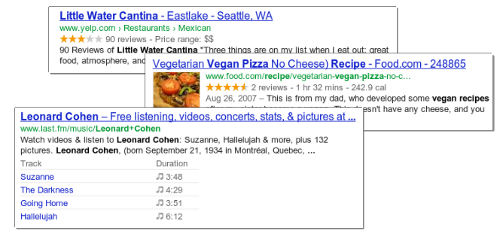
Rabu, 03 Oktober 2012

Rich snippets guidelines

Webmaster level: All


Traditional, text-only, search result snippets aim to summarize the content of a page in our search results. Rich snippets (shown above) allow webmasters to help us provide even better summaries using structured data markup that they can add to their pages. Today we're introducing a set of guidelines to help you implement high quality structured data markup for rich snippets.

Once you've correctly added structured data markup to you site, rich snippets are generated algorithmically based on that markup. If the markup on a page offers an accurate description of the page's content, is up-to-date, and is visible and easily discoverable on your page and by users, our algorithms are more likely to decide to show a rich snippet in Google’s search results.

Alternatively, if the rich snippets markup on a page is spammy, misleading, or otherwise abusive, our algorithms are much more likely to ignore the markup and render a text-only snippet. Keep in mind that, while rich snippets are generated algorithmically, we do reserve the right to take manual action (e.g., disable rich snippets for a specific site) in cases where we see actions that hurt the experience for our users.

To illustrate these guidelines with some examples:
  • If your page is about a band, make sure you mark up concerts being performed by that band, not by related bands or bands in the same town.
  • If you sell products through your site, make sure reviews on each page are about that page's product and not the store itself.
  • If your site provides song lyrics, make sure reviews are about the quality of the lyrics, not the quality of the song itself.
In addition to the general rich snippets quality guidelines we're publishing today, you'll find usage guidelines for specific types of rich snippets in our Help Center. As always, if you have any questions or feedback, please tell us in the Webmaster Help Forum.

Kamis, 20 September 2012

Structured Data Testing Tool

Webmaster level: All

Today we’re excited to share the launch of a shiny new version of the rich snippet testing tool, now called the structured data testing tool. The major improvements are:
  • We’ve improved how we display rich snippets in the testing tool to better match how they appear in search results.
  • The brand new visual design makes it clearer what structured data we can extract from the page, and how that may be shown in our search results.
  • The tool is now available in languages other than English to help webmasters from around the world build structured-data-enabled websites.
Here’s what it looks like:
The new structured data testing tool works with all supported rich snippets and authorship markup, including applications, products, recipes, reviews, and others.

Try it yourself and, as always, if you have any questions or feedback, please tell us in the Webmaster Help Forum.

Written by Yong Zhu on behalf of the rich snippets testing tool team


Selasa, 31 Juli 2012

Introducing the Structured Data Dashboard

Webmaster level: All

Structured data is becoming an increasingly important part of the web ecosystem. Google makes use of structured data in a number of ways including rich snippets which allow websites to highlight specific types of content in search results. Websites participate by marking up their content using industry-standard formats and schemas.

To provide webmasters with greater visibility into the structured data that Google knows about for their website, we’re introducing today a new feature in Webmaster Tools - the Structured Data Dashboard. The Structured Data Dashboard has three views: site, item type and page-level.

Site-level view
At the top level, the Structured Data Dashboard, which is under Optimization, aggregates this data (by root item type and vocabulary schema).  Root item type means an item that is not an attribute of another on the same page.  For example, the site below has about 2 million Schema.Org annotations for Books (“http://schema.org/Book”)


Itemtype-level view
It also provides per-page details for each item type, as seen below:


Google parses and stores a fixed number of pages for each site and item type. They are stored in decreasing order by the time in which they were crawled. We also keep all their structured data markup. For certain item types we also provide specialized preview columns as seen in this example below (e.g. “Name” is specific to schema.org Product).


The default sort order is such that it would facilitate inspection of the most recently added Structured Data.

Page-level view
Last but not least, we have a details page showing all attributes of every item type on the given page (as well as a link to the Rich Snippet testing tool for the page in question).


Webmasters can use the Structured Data Dashboard to verify that Google is picking up new markup, as well as to detect problems with existing markup, for example monitor potential changes in instance counts during site redesigns.