Kamis, 18 November 2010

Ten times more applications for Google Apps customers

(Cross-posted on the Google Enterprise Blog and the Google Small Business Blog)

As customers begin to recognize large productivity gains with Gmail, Google Docs and the rest of Google Apps, they frequently ask when they’ll be able to use services like Google Voice, Reader, Blogger and AdWords with their Google Apps accounts. We’ve steadily added new functionality to Google Apps and recently added support for third-party apps, but we’re thrilled to swing the floodgates of new functionality wide open now. Starting today, customers worldwide can access a full spectrum of services from Google—including more than 60 productivity-boosting applications that extend far beyond any traditional software suite.

Coupled with the ability for administrators to provide different sets of applications to different groups of users, the possibilities for empowering workers in new ways are remarkable. For example, you could equip your marketing team with Picasa Web Albums so they can collect and share photos from customer appreciation events, and let that team publish your company’s blog with Blogger. Services like iGoogle and Alerts, on the other hand, may be broadly useful, and could be enabled for your whole organization.


Existing customers can transition at their own pace over the next couple months to the new infrastructure supporting these applications from the administrative control panel. New customers will automatically have the new infrastructure. The additional services are not covered by the Google Apps SLA or telephone support, but we’ll be watching for feedback how we can make these new applications even more useful.

In tandem with this big improvement, we’re also simplifying the names of the versions of Google Apps. Here’s how we now refer to our line-up:
  • Google Apps is our free service geared towards families, entrepreneurs and other groups up to 50 users.
  • Google Apps for Business offers 25GB of email storage per user, a 99.9% uptime guarantee, data migration capabilities, advanced management tools, telephone support, added security features and more, all for $50 per user per year.
  • Google Apps for Government is FISMA certified and designed with local, state and federal agencies in mind.
  • Google Apps for Education offers many benefits of Google Apps for Business, but at no cost to schools, universities and qualifying non-profits.
The team has worked hard to unlock all of this new functionality for our customers, and we think many of these new applications will become indispensable within your organization. To help get you started, each day the Google Enterprise Blog will profile how your organization could put a different application to use. The first post tomorrow will focus on Google Reader, so visit the Enterprise Blog to follow the series.

Rabu, 17 November 2010

Petits fours in your search results

Webmaster Level: All

Recently we made a change to show more results from a domain for certain types of queries -- this helped searchers get to their desired result even faster. Today we’re expanding the feature so that, when appropriate, more queries show additional results from a domain. As a webmaster, you’ll appreciate the fact that these results may bring targeted visitors directly to the pages they’re interested in.

Here’s an example: in the past, the query [moma] (the Museum of Modern Art), might have triggered two results from the official site:


With this iteration, our search results may show:
  • Up to four web results from each domain (i.e., several domains may have multiple results)
  • Single-line snippets for the additional results, to keep them compact
As before, we still provide links to results from a variety of domains to ensure people find a diverse set of sources relevant to their searches. However, when our algorithms predict pages from a particular site are likely to be most relevant, it makes sense to provide additional direct links in our search results.


Like all the hundreds of changes we make a year, we’re trying to help users quickly reach their desired result. Even though we’re constantly improving our algorithms, our general advice still holds true: create compelling, search-engine friendly sites in order to attract users, buzz, and often targeted traffic!

Editing your Google Docs on the go

(Cross-posted on the Google Docs Blog, Google Enterprise Blog and the Google Mobile Blog)

With Google Docs, we’re always trying to make you more productive—and part of that means making it possible for you to get things done from anywhere, at anytime. That’s why we’re excited that the new documents editor now supports editing on your mobile browser. We’re rolling this out over the next few days.

That means that...
  • You can work on that important memo...while on the bus or train to work.
  • If you’re behind on a group proposal, but really want to make it to the ball game tonight, your whole team can work on it from the bleacher seats.
  • You can take minute-by-minute notes at a concert so you’ll always remember the setlist. And your friends can jealously follow in real-time at home.
  • ...and the list goes on!
Take a look at this video to see mobile editing in action:


It’s easy to get started: visit docs.google.com in a browser on a supported device, and select the document you want to edit. Then, when you’re viewing it, press the Edit button to switch to the mobile editor.


In the next few days, we’re rolling this out to English-language users around the world on Android with Froyo (version 2.2) and on iOS devices (version 3.0+) including the iPad. We’ll be adding support for other languages soon. And as before, we also support editing of spreadsheets from your mobile device’s browser.

We hope you enjoy editing your documents on the go—especially when you’re at the game with a hot dog in your other hand.

Introducing Boutiques: a new way to shop for fashion online

The way we shop for fashion is different from how we buy cameras—especially online. With fashion, reviews and specs are less important; fashion shopping is about discovering something that fits your taste and feels right. The web works well for buying cameras and other hard goods but for soft goods, such as clothing and accessories, it’s not the same as shopping in a store.

What’s more, the market for soft goods online is growing tremendously. A year and half ago, our team (which at the time was part of Like.com) started to wonder if we could create a better experience for people to shop online. Our team consists of PhDs in computer science with an emphasis on machine learning and computer vision, along with fashion designers and stylists—we jokingly called ourselves the computer nerds and fashion nerds (and a few of us were both). So, we set out to create a new way to browse, discover and shop for soft goods online.

Today, we’re excited to share with you our first step towards realizing this goal. It’s called Boutiques.com: a personalized shopping experience that lets you find and discover fashion goods, by creating your own curated boutique or through a collection of boutiques curated by taste-makers—celebrities, stylists, designers and fashion bloggers. Boutiques uses computer vision and machine learning technology to visually analyze your taste and match it to items you would like.


In fashion, there are lots of choices. If there are, say, 500,000 items in a store, that means there are literally billions of different combinations of outfits you can make with those items. How do you sort through all of this? This site had to be a collaboration.

First we partnered with taste-makers of all types. We asked them not just to curate 10-50 great items they loved, but also to teach our site their style and taste. They did this by telling us what colors, patterns, brands and silhouettes they loved and they hated. They took a visual quiz that taught the site to understand their style genre: Classic, Boho, Edgy, etc. Our machine learning algorithms use this information to enable you to shop all of the inventory in the style of that taste-maker, on top of the 50 items they’ve hand-curated.

These days, bloggers, stylists and everyday fashionistas are expressing their sense of style online. We invited them to create boutiques so people could shop their diverse styles. But you have a unique and independent style too, so Boutiques also lets you build your own personalized boutique and get recommendations of products that match your taste.

In addition to all this, Boutiques offers a variety of features to search and discover merchandise including:

Advanced search filters - Filter by genre, silhouette, pattern, color families and sizes.


Inspiration photos - Try a search for [yellow pumps] and you’ll see matching outfit ideas to the right of the search results. We feature images from streetstyle sites, and collage and styling sites to provide you with the online equivalent of styled mannequins to give you inspiration.

Complete the Look - Ever wonder what to pair with that dress? Our fashion designers wrote hundreds of style rules—like “heavily patterned handbags don’t tend to go with heavily patterned dresses”—that we used to develop a tool to suggest items that match.

Visual search - Sometimes you love an item but not in a particular color. We analyze the photograph of an item for its color, shape and pattern and try to help you find visually similar items.

Boutiques on your tablet - Download our iPad application, lean back and move through inventory as if you were flipping through clothes on a rack at the store.

You can start shopping now at Boutiques.com. At this time, Boutiques is only available in the U.S. and only for women’s fashion, but we plan to expand in the future. Tell us what you think on our feedback form. And if you’re a designer, stylist, celebrity or retailer and want to participate on Boutiques.com, drop us a line.

Selasa, 16 November 2010

Google Voice for iPhone

(Cross-posted from the Google Voice Blog and on the Google Mobile Blog)

Earlier this year we launched a Google Voice HTML5 web app for iPhone users. Today we’re taking the Google Voice experience on the iPhone to a whole new level with the launch of the official Google Voice for iPhone app.

With this native app, you’ll continue to have access to all the major Google Voice features on your iPhone, like:
  • Cheap rates for international calls
  • Free text messaging to U.S. numbers
  • Voicemail transcription
  • Display your Google Voice number as caller ID when making calls
In addition to these benefits, the app provides some features that make using Google Voice on your iPhone a much better experience:
  • With push notifications, the app will alert you instantly when you receive a new voicemail or text message
  • Most of your calls will be placed via Direct Access Numbers, making them connect just as quickly as regular phone calls


Google Voice for iPhone is available to download from the Apple App Store today. You’ll need an iPhone with iOS 3.1 or later and a valid Google Voice account to use the app. At this time, Google Voice is available in the U.S. only.

Offline, meet online: a marketing experiment with Google Goggles

About a year ago, we launched Google Goggles, an app that enables people to search the web by taking pictures with their mobile devices. Since then, people have used Goggles to search for information about lots of different things: famous paintings, landmarks, products and much more.

Today, we’re announcing a Google Goggles marketing experiment. We’re working with five brands—Buick, Disney, Diageo, T-Mobile and Delta Air Lines—to extend some of their offline marketing to the mobile web. They have “Goggles-enabled” some of their print ads, movie posters and other media. When users take pictures of these with Google Goggles, they will be recognized by the app, and users will have the option of clicking-through directly to a mobile destination from the brand.

For a closer look at these specific campaigns, take a look at our video:


We developed Google Goggles so that people could more easily explore the world around them with a mobile device. In this experiment, we’re applying the same principles, and the same technology, by “Goggles-enabling” advertisements and other media, and offering to link people to the mobile sites from these brands.

When you scan this "Goggles-enabled" Buick ad with Google Goggles, you can connect directly with Buick's mobile experience. Click the image to enlarge.

To interact with these experimental campaigns, download Google Goggles from the Android Market or get Google Mobile App for iPhone from the iTunes store, and look for advertising and products from companies in the video above and others that are coming soon.

Senin, 15 November 2010

Improvements to Product Search for this holiday season

Every year retailers start the holiday shopping season earlier and earlier—and still I procrastinate until late December before getting started. This year I've already made my list and I’m ready to go.

I usually get my holiday shopping done in two ways: online (e-commerce) and offline (“brick and mortar” stores). I’ve found that shopping online is best when you know what you're looking for—you can search for specific items, research multiple brands or compare reviews. On the other hand, shopping offline makes it easier to explore products in person and sometimes discover things that you didn’t know existed. Plus, it’s usually the only way to take your purchase home the same day.

The line between online and offline shopping is starting to blur: According to a study by Forrester while 93 percent of retail purchases today happen in a store, more than 46 percent of those in-store purchases are influenced by online research. Not to mention that shoppers can access the web from anywhere at anytime—including from their mobile phones when browsing the aisles of a local store.

All of this got our team thinking about how we could help further bridge the gap between online and offline shopping. This week, we’re introducing several new features to Product Search that start doing just that.

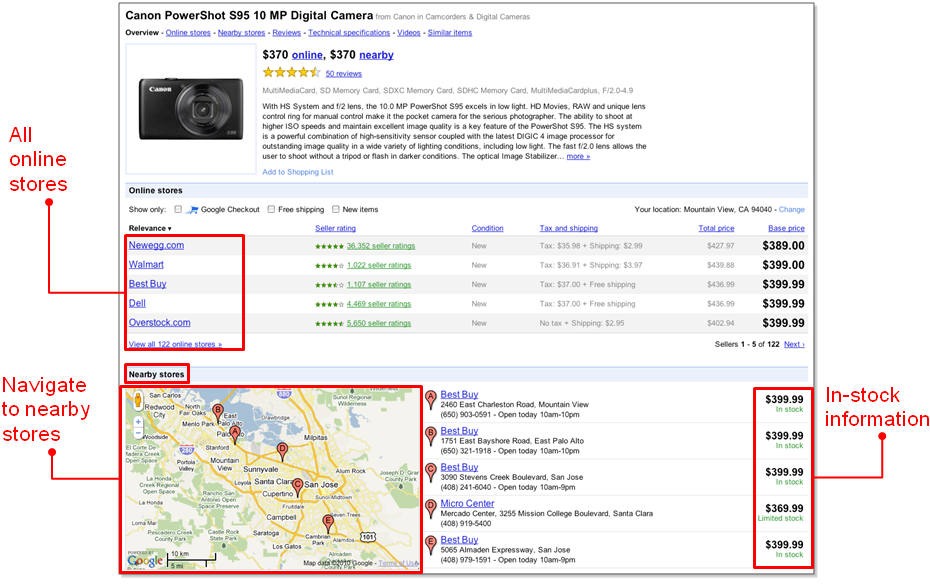
Local availability on Google Product Search: We’ve partnered with more than 70 retail brands—including national retailers like Best Buy and Williams-Sonoma, as well as software manufacturers like JDA, Epicor and Oracle—to connect shoppers searching online with local stores that have the items they’re are looking for in-stock. For example, if you’re looking online to get your son that new Wii video game he’s been wanting, you can click on the “nearby stores” link to see where it’s in stock nearby. (If you’re a retailer who’s interested in taking part, you can learn more on the Google Retail Blog.)


Local Availability in Google Product Search
Google Shopper 1.3: Our mobile shopping app helps shoppers on the go research items and find the best place to buy them either online or in a nearby store—and it already has more than 2.5 million downloads. This version includes new search filters like “price” and “brand” to help refine your search. And, you’ll still get features like Local Availability, voice search and rapid continuous barcode scanning (so you can point your phone at a product and get information from the web).

“Popular products” and “aisles”: We’ve borrowed an idea from successful brick and mortar stores and in the coming weeks, we'll roll-out two features called “popular products” and “aisles” to help people learn about and discover new products. When you search for a category of products such as “camera lenses,” our new popular products feature helps you get started by showing you the lenses other people are viewing online. “Aisles” helps you browse and discover products by organizing results into sub-categories that others have found helpful. For example, if you’re looking for a new TV, you can choose between display types like LCD and plasma. If you’re interested in camera lenses for that brand new SLR, you can shop by the aperture of the lens.

Aisles and Popular Products
We hope these features make it easier for you to get your shopping done this holiday season—whether it’s online, offline or in the new space in between.

Happy shopping!